
MCP Apps
MCP Apps are based on the MCP ext-apps specification — an open standard for rendering interactive UI views inside AI conversations.
MCP Apps are the portable baseline across hosts (e.g. Claude, Goose, VSCode, and ChatGPT compatibility mode). frac implements the protocol via the McpAppAdaptor so you use the same hooks regardless of runtime.
View Rendering Flow
Section titled “View Rendering Flow”Here’s what happens when an MCP Apps client renders a view:
- User asks the AI to perform an action (e.g., “Show me flight options to Paris”)
- The client calls your MCP tool (e.g.,
search_flights) - Your tool returns a result with data and a reference to a UI resource
- The client fetches the resource (your compiled React component) and renders it in an iframe
- The view communicates with the host via the MCP protocol and is hydrated with your tool’s
structuredContentand_metaproperties
The view–host connection looks like this:
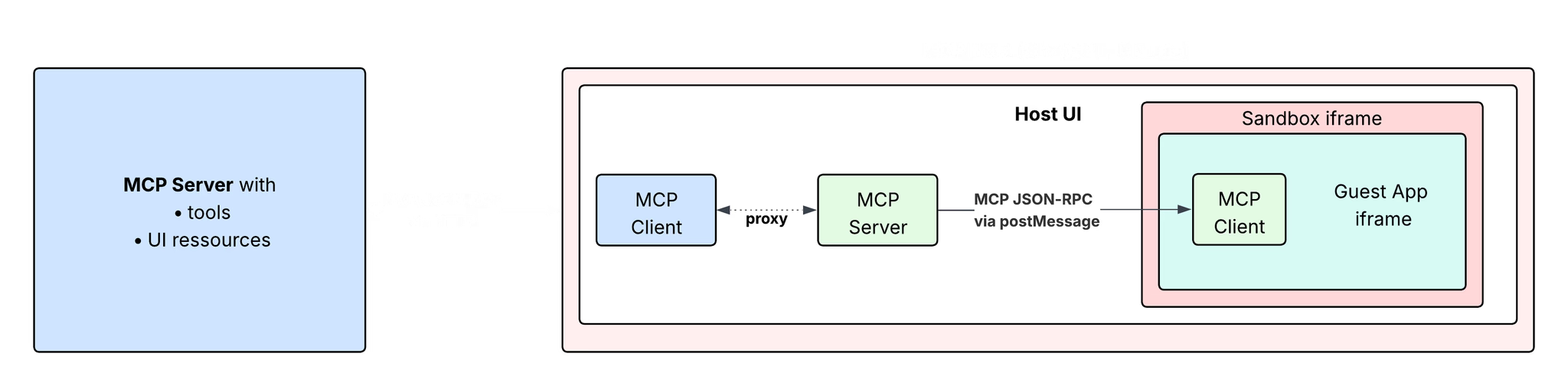
The Host UI in this diagram designates the MCP Client (Claude, Goose, VSCode, etc.), and the Guest App is your App running in an iframe.
The MCP ext-apps protocol
Section titled “The MCP ext-apps protocol”Views run inside an iframe and talk to the host via the same MCP protocol used by your server. The ext-apps spec defines guest-to-host requests and host-to-guest notifications for the view:
Guest-to-host requests
Section titled “Guest-to-host requests”| Method | Description |
|---|---|
ui/initialize | Handshake to establish connection |
ui/open-link | Open external URLs |
ui/message | Send follow-up messages to the conversation |
ui/request-display-mode | Request display mode change |
ui/update-model-context | Update view state for the model |
tools/call | Invoke MCP tools |
Host-to-guest notifications
Section titled “Host-to-guest notifications”| Notification | Description |
|---|---|
ui/notifications/host-context-changed | Theme, locale, display mode, viewport, or other host context updated |
ui/notifications/tool-input | Tool arguments provided |
ui/notifications/tool-result | Tool execution completed |
ui/notifications/tool-cancelled | Tool call was cancelled |
ui/notifications/tool-input-partial | Streaming partial tool arguments (e.g. while the model is still sending) |
frac Hook Mapping
Section titled “frac Hook Mapping”frac wraps the MCP ext-apps protocol with the same React hooks as the Apps SDK. The McpAppAdaptor translates hook usage into the protocol under the hood:
| Protocol | frac Hook | Purpose |
|---|---|---|
ui/notifications/tool-input, tool-result, metadata | useToolInfo() | Access tool input, output, and _meta |
ui/update-model-context | useViewState(), data-llm | Persistent view state / model context |
tools/call | useCallTool() | Make additional tool calls |
ui/message | useSendFollowUpMessage() | Send follow-up messages |
ui/open-link | useOpenExternal() | Open external URLs |
ui/request-display-mode | useDisplayMode() | Access/change display mode |
ui/notifications/host-context-changed (theme, maxHeight, safeArea) | useLayout() | Theme, max height, safe area insets |
ui/notifications/host-context-changed (locale, userAgent) | useUser() | Locale and device/capabilities |
| Modal (polyfilled) | useRequestModal() | Request modal display (renders in-iframe) |
ui/notifications/size-changed | useRequestSize() | Manually report view size (ext-apps autoResize handles this by default) |
MCP Apps methods not yet supported in frac
Section titled “MCP Apps methods not yet supported in frac”The following MCP ext-apps protocol methods are not yet wrapped by frac hooks:
| Protocol Method | Purpose |
|---|---|
ui/notifications/tool-input-partial | Streaming partial tool arguments (e.g. while the model is still sending) |
ui/notifications/tool-cancelled | Tool call was cancelled |
You can access tool-input-partial and tool-cancelled directly via useMcpAppContext when running in MCP Apps clients, if needed. Support may be added in a future release.
MCP Apps limitations
Section titled “MCP Apps limitations”Not all frac features exist in the ext-apps spec. When using frac in MCP Apps clients, the following features are either not supported or polyfilled:
| Feature | Apps SDK | MCP Apps |
|---|---|---|
| useFiles, useSetOpenInAppUrl | ✅ | ❌ Not supported |
| useRequestModal | Portaled to host | ⚠️ Polyfilled (renders in-iframe) |
| useViewState, data-llm | Persisted by host | ⚠️ Polyfilled (state doesn’t persist across view renders) |
Graceful degradation: Unsupported features throw; polyfilled ones work with limitations. See the compatibility matrix for details.
Testing MCP Apps
Section titled “Testing MCP Apps”Please see the Test Your App guide for more information.
Related
Section titled “Related”- Apps SDK (ChatGPT) - The ChatGPT-specific runtime
- Write Once, Run Everywhere - How frac abstracts both runtimes
- API Reference - Full compatibility matrix
- useMcpAppContext - Low-level MCP context hook